In our latest report, we promised you would not have to wait another three weeks to hear (or read) from us. And here we are again, but not with any of the anticipated topics (build time reduction and Euruko 2016), but with a call for help in a topic that could really make a difference for (open)SUSE.
Nowadays, YaST team is trying to fix a long-standing issue in the installer: low-vision accessibility. In the past, a user could get a high-contrast mode just pressing shift+F4 during installation. Unfortunately, that feature does not work anymore and, to be honest, changing to a high-contrast palette is not enough. Other adjustments, like setting better font sizes, should be taken into account.
Another option is to use the textmode installation and set some obscure variable (Y2NCURSES_COLOR_THEME) to get the high-contrast mode. But it sounds like the opposite to user friendly.
Some days ago, the team fired up the discussion in the opensuse-factory mailing list but we would like to reach as many people as we can to gather information and feedback about this topic. Getting some affected people involved in the process would be really awesome!
For the time being we’re already working on some improvements:
- Adding a Linuxrc option so the user can set the high-contrast mode from the very beginning.
- Fixing shift+F4 support.
- Improving the high-contrast mode appearance. Below you can see a screenshot of the work in progress.
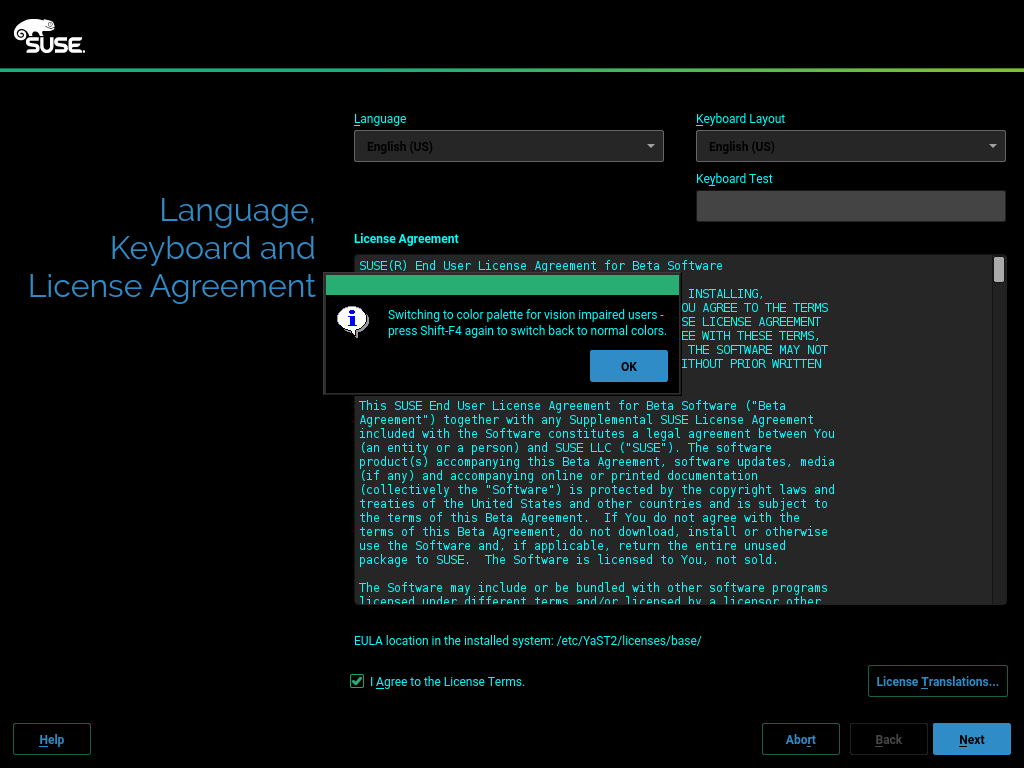
But we would like to hear from you. You can raise your voice in the already mentioned thread at the opensuse-factory mailing list or leave a comment in the related pull request at Github. If you prefer to have a chat, we’re also available on the #yast IRC channel at Freenode… and we love to see people there. 😉
Please, join us to make YaST even better!