It’s Christmas time and since (open)SUSE users have been nice, the YaST team brings some gifts for them. This is the result of the last development sprint of 2016.
As you may have noticed, in the latest sprints we have been focusing more and more in making SUSE CASP possible. That’s even more obvious in this last sprint of the year. For those that have not been following this blog recently, it’s probably worth to remember that SUSE CASP will be a Kubernetes based Container As a Service Platform.
But our daily work goes beyond CASP, so let’s take a look to all the highlights.
More improvements in the management of DHCLIENT_SET_HOSTNAME
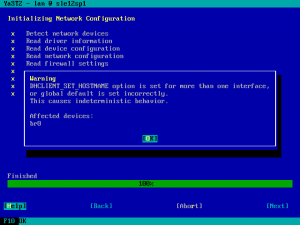
In the previous report we presented the changes introduced in yast2-network to make the configuration parameter DHCLIENT_SET_HOSTNAME configurable in a per-interface basis.
One of the great things about working in an agile an iterative way, presenting and evaluating the result every three weeks, is that it allows us to detect room for improvements in our work. In this case we noticed some discrepancy in the expectations of Linuxrc and yast2-network and also some room for improvement in the code documentation and in the help texts.
Thus, we used this sprint to refine the work done in the previous one and tackle those problems down.
Ensure installation of needed packages
Another example of iterative development. We already presented in the report of the 26th development sprint a new mechanism to detect when the user had deselected during installation some package that was previously pre-selected by YaST in order to install the bootloader. Since the new functionality proved to work nicely, we decided to extend it to cover other parts of the system beyond the bootloader.
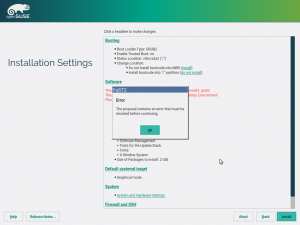
The software proposal now contains an error message including a list of missing packages or patterns, in case the user deselects some needed items.
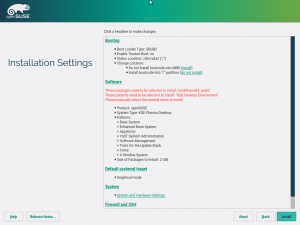
After clicking the Install button the installation is blocked, the user must resolve the problem either by selecting the packages back or by adjusting the respective YaST configuration (e.g. do not install any bootloader and disable the firewall).
Rethinking the expert partitioner
May we insist one more time on the topic of using Scrum to organize our work in an iterative way? 😉 As our usual readers should already know, we structure the work into minimal units that produce a valuable outcome called PBIs in Scrum jargon. That valuable outcome doesn’t always have to be a piece of software, an implemented feature or a fixed bug. Sometimes a document adds value to YaST, specially if it can be used as base to collaborate with people outside the team.
Our readers also know that we are putting a lot of effort in rewriting the whole storage layer of YaST. That also implies rewriting the most powerful tool known by humanity to define partitions, volumes, RAIDs and similar stuff – the YaST expert partitioner.
It would be great if we could use the opportunity to make it both more powerful and more usable. You can take the first part for granted, but we are not so sure about our UI design skills. That’s why we wanted to have a base to discuss possible changes and alternative approaches with UX (user experience) experts. And we decided that it was worth to invest some time to create a document collecting the state of the art and some ideas for the future and to send that to SUSE experts in UX and to anybody with some interest in the topic.
Here you can find that fine piece of documentation. Take a look to that document if you want to peek into YaST developers’ mind. That’s the kind of stuff we discuss when we are about to start rewriting something… specially something that need to serve hundreds of different use cases.
And of course we would like to know your ideas or thoughts. We usually discuss this stuff at the public #yast IRC channel and at the yast-devel mailing list. But if you prefer so, you can simply open an issue at the repository hosting the document. Whatever works for you.
Rethinking yast2-network
But that was not the only documentation PBI finished during this sprint. Inspired by the first fruits of the storage layer reimplementation, we decided yast2-network also deserves a reincarnation.
As we did in the past with yast2-storage and libstorage, the first step is to collect as much information as possible about what can be currently done with the module and how it behaves in several situations, specially in tricky or complex scenarios. The outcome was three documents, one about the behavior during installation (installation.md), a second one about AutoYaST (autoinstallation.md) and another collecting general features (features.md).
CASP: merged dialogs for root password and keyboard layout
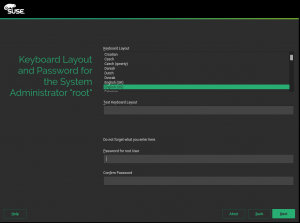
CASP is a product targeted to a quite specific use case with simplicity as a main priority. The installation process has been streamlined to a minimal set of dialogs to configure just the very basic stuff. Among other removed things, there is no step to configure the system language. That can be a problem when entering the root password (the only user that will be created during installation), since the language settings screen is normally also used to select the keyboard layout.
The implemented solution is shown in the screenshot below. As you can see, the keyboard layout and root passwords selections are merged into a single step. As a bonus, we made both widgets more reusable, opening the possibility to place the root password widget or the keyboard layout selection anywhere.
Storage reimplementation: handling GPT disks in the installation proposal
After several sprints reporting small steps forward, in the 27th sprint we were happy to announce that our testing ISO for the new storage stack was fully installable under certain circumstances. As we reported, it worked in UEFI or legacy systems with the only requirement of having a pre-existing MBR partition table in the disk.
Now we can say it also works with GPT partition tables and even with systems with a mixture of both technologies.
Making the GPT scenario work was much harder that it sounds due to several factors, like the strange way in which parted handles partition types in GPT or some peculiarities in the way the space is distributed in such partition tables.
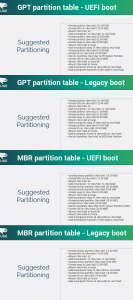
But now our test ISO can install a fully functional system in the four combinations of MBR/GPT partition table and UEFI/Legacy boot, as it can be seen in the next image.
The storage reimplementation gets its own openQA instance
But there are better ways than screenshots to prove that something is working, even to prove it keeps working after future modifications. And in (open)SUSE we have one of the best tools for that – openQA.
We have always considered having the new stack tested in openQA as the first big milestone in its development (and we are finally there!) but we are aware that openQA.opensuse.org is already quite busy testing a huge combination of products, architectures and scenarios… even testing releases of openQA itself. Fortunately openQA is free software and can be installed anywhere so we created our own instance of openQA to test YaST stuff, specially the new storage layer.
So far, that instance is hosted in the internal SUSE network, which is enough for us to get continuous feedback about the changes we introduce. In addition to installing the new instance and configuring it to continuously grab and check the latest testing ISO, we had to introduce several changes in the ISO itself with the goal of keeping our tests as aligned as possible with the tests performed in the current Tumbleweed version by openQA.opensuse.org.
For example, we made sure the ISO was properly signed to avoid the need to always pass the insecure=1 boot argument. We also included several packages that were missing in order to make sure the ISO included all the software checked during the so-called MinimalX test and to make sure it shared the look and feel with a regular Tumbleweed, since many openQA checks are screenshot-based.
From now on, we can back every new feature with the corresponding integration tests, something crucial to ensure the quality of a piece of software meant to handle storage hardware.
Making Snapper work without DBus
As you may know, some YaST team members are also the main developers and maintainers of Snapper, the ultimate file-system snapshot tool for GNU/Linux systems.
Normally the snapper command line tool uses DBus to connect to snapperd which does most of the actual work. This allows non-root users to work with snapper.
There are however situations when using DBus is not possible and not being able to work in those situations was limiting Snapper’s usefulness. Now with the latest version all snapper commands support the –no-dbus option. This evolution is worth a blog post by itself… and, of course, we have it. To know all the details check this post at Snapper’s blog.
CASP (and beyond): improved roles
Do you remember the system roles feature introduced during development sprint 16 and improved in subsequent sprints? In case you don’t, let us remind you that system roles allow to define many settings of the installation just by choosing one of the offered roles. That’s only possible, of course, in products making use of that feature, like SLES.
For CASP we will have 3 different roles, as shown in the following screenshot.
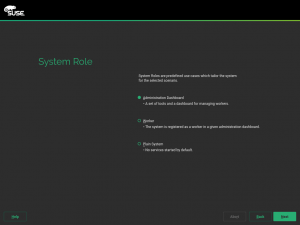
The main difference between these three roles is the selection of patterns to be installed. But apart from that, the Worker role will offer an extra step during installation allowing the user to specify the address of the so-called Administration Dashboard.
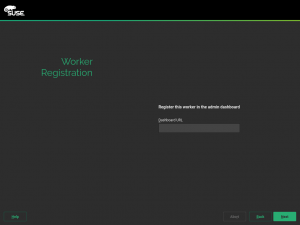
That relatively small detail implied the development of a full new feature in the installer – the ability of a given role to define it’s own specific configuration, including the dialog to interact with the user. As expected from any other installation dialog, you can go back and forward without loosing the entered information. If the user goes back and selects a different role, then this additional dialog is not run again.
That new feature is, of course, not specific to CASP and could eventually be used in other products and roles. Just as a crazy example, openSUSE could decide to introduce a role called “NTP server”, running the YaST NTP server configuration right after the user selecting the role.
Other CASP related features
As already said, we have been focusing quite a lot on introducing features that are needed for CASP. It’s worth mentioning, in case it’s still unclear, that CASP will NOT ship its own adapted version of YaST. All the features introduced in the installer are in fact configurable and available for all other products as well. There is only one YaST codebase to rule them all.
Let’s briefly describe some of the introduced CASP-specific (at least for the time being) features.
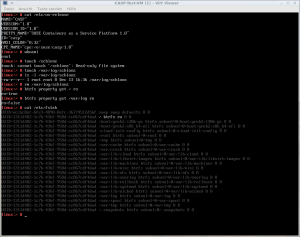
CASP always uses Btrfs as filesystem for the root partition. At the end of the installation, the root btrfs subvolume will become read-only. All the other subvolumes will stay as read-write, as shown in this screenshot taken right after rebooting at the end of the installation process.
It makes no sense to update from any existing product to CASP. Thus, CASP media should not show an “update” option when booting, even if it’s still possible for advanced users to pass the UPDATE boot parameter. Since we needed to modify the installation-images package, we took the opportunity to make the “update” option and other settings configurable in a per product basis and we unified SLES and openSUSE packages, so now they share a single branch in the source code repository.
CASP is targeted to big deployments extended all over the world. To make possible the synchronization of geographically distributed nodes, the UTC timezone is enforced in every CASP installation. Thus, we implemented support for products to enforce a given timezone in the installer. Take into account this is different from a default timezone.
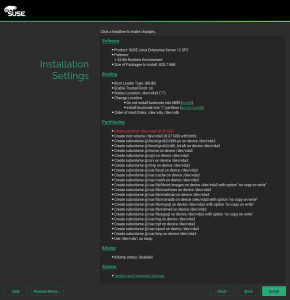
Last but not least, it has already been mentioned that the CASP installation workflow will have very few steps. That also affects the screen displaying the installations settings summary. In comparison to a regular SLES, some options must disappear because they are not configurable and some other sections must be added because they are not longer presented as a separate previous step. So far, this is the appearance of the installation settings screen in the current CASP prototype.
…and a surprise about the blog
We also prepared a Christmas gift related to the blog. The technical aspects are solved, but we are ironing out the administrative details. So you will have to wait until the next sprint report to see it in full glory. But, as the Spanish proverb says, “good things are worth waiting for”.
See you next year
That’s enough to report from our December sprint, we don’t want to bore you with every small bug fix. And talking about things that are worth waiting for, our next report will very likely be published at the beginning of February 2017.
That’s because we will put our Scrum process on hold during the Christmas session. We will restart it on the second week of the year, after the visit of the Three Wise Men. In several countries, it’s a tradition that the Three Kings bring gifts to the kids that have been nice, so let’s expect they bring us some new members for the team!