

Some days ago I was asked what this little button bar on my desktop is and I explained that it’s only a small program I wrote to keep track on my mail folders. I know there are many many programs out there which already does the same but for some reason he liked it and encouraged me to blog about it 🙂
qbiff runs as a server client application and is able to manage mails stored in the maildir format. The server should run on the machine which locally stores the data and the client or multiple of them can run on the desktop you have an eye on. The connection(s) between the server and the client(s) are SSL connections, even though there is no mailcontent which is transfered the information how many mails, how many new ones and what mail folders exists might be an information not everybody needs to know about… so I chose a secure connection 😉
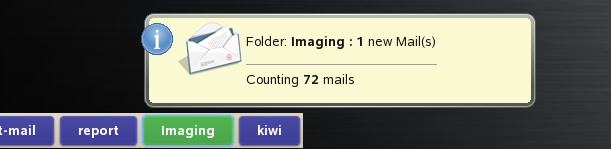
If the file .qbiffrc exists the user can control which mail folders should be checked, if the file doesn’t exist all folders the server finds at start up will be used. Each folder is represented by a button. Whenever a new mail arrives the button changes its color and notifies the user with a tip window about the current mail situation of this folder. A click on the button runs a user defined program whereas the first parameter is the path and name of the folder. In my setup I call mutt respectively to read the mail in the folder
So it looks basically like this…
Packages can be found in my home Project at:
- http://download.opensuse.org/repositories/home:/sax2
- Install the package qbiffd on your server
- Install the package qbiff on your client, server and client could be the same machine
- Edit the file /etc/sysconfig/qbiff on the server and setup at least the QBIFF_USER which should be the same user the mails belong to and the QBIFF_FOLDER which is the base directory of your mails
- Run the server by calling rcqbiffd start
- Run the client by calling qbiff-client. The default password for the SSL certificates is “linux“
- click on a folder button and read the note about how to setup a personal mail reader script
If you want to create your own certificates you need to check out the code at
- svn co https://svn.berlios.de/svnroot/repos/qbiff/qbiff-head .
and run the following commands:
- cd cert-server && make distclean && make
- cd ../cert-client && make distclean && make
- cd ..
- ./.certinstall on the server and the client
Both comments and pings are currently closed.


