Home Home
Sign up | Login

Author Archive

Introducing snapper: A tool for managing btrfs snapshots

April 1st, 2011 by

Today we want to present the current development of snapper, a tool for managing btrfs snapshots.

For years we had the request to provide rollbacks for YaST and zypper but things never got far due to various technical problems. With the rise of btrfs snapshots we finally saw the possibility for a usable solution. The basic idea is to create a snapshot before and after running YaST or zypper, compare the two snapshots and finally provide a tool to revert the differences between the two snapshots. That was the birth of snapper. Soon the idea was extended to create hourly snapshots as a backup system against general user mistakes.

The tool is now in a state where you can play with it. On the other hand there is still room and time for modifications and new features.

Overview

We provide a command line tool and a YaST UI module. Here is a brief tour:

First we manually create a snapshot:

# snapper create --description "initial"

Running YaST automatically creates two snapshots:

# yast2 users

Now we can list our snapshots:

# snapper list
Type   | # | Pre # | Date                     | Cleanup  | Description
-------+---+-------+--------------------------+----------+-------------
single | 0 |       |                          |          | current
single | 1 |       | Wed Mar 30 14:52:17 2011 |          | initial
pre    | 2 |       | Wed Mar 30 14:57:10 2011 | number   | yast users
post   | 3 | 2     | Wed Mar 30 14:57:35 2011 | number   |
single | 4 |       | Wed Mar 30 15:00:01 2011 | timeline | timeline

Snapshot #0 always refers to the current system. Snapshot #2 and #3 were created by YaST. Snapshot #4 was created by an hourly cronjob.

Getting the list of modified files between to snapshots is easy:

# snapper diff 2 3
c... /etc/group
c... /etc/group.YaST2save
c... /etc/passwd
c... /etc/passwd.YaST2save
c... /etc/shadow
c... /etc/shadow.YaST2save
c... /etc/sysconfig/displaymanager
c... /var/tmp/kdecache-linux/icon-cache.kcache
c... /var/tmp/kdecache-linux/plasma_theme_openSUSEdefault.kcache

You can also compare a single file between two snapshots:

# snapper diff --file /etc/passwd 2 3
--- /snapshots/2/snapshot/etc/passwd    2011-03-30 14:41:45.943000001 +0200
+++ /snapshots/3/snapshot/etc/passwd    2011-03-30 14:57:33.916000003 +0200
@@ -22,3 +22,4 @@
 uucp:x:10:14:Unix-to-Unix CoPy system:/etc/uucp:/bin/bash
 wwwrun:x:30:8:WWW daemon apache:/var/lib/wwwrun:/bin/false
 linux:x:1000:100:linux:/home/linux:/bin/bash
+tux:x:1001:100:tux:/home/tux:/bin/bash

The main feature of course is to revert the changes between two snapshots:

# snapper rollback 2 3

Finally yast2-snapper provides a YaST UI for snapper.
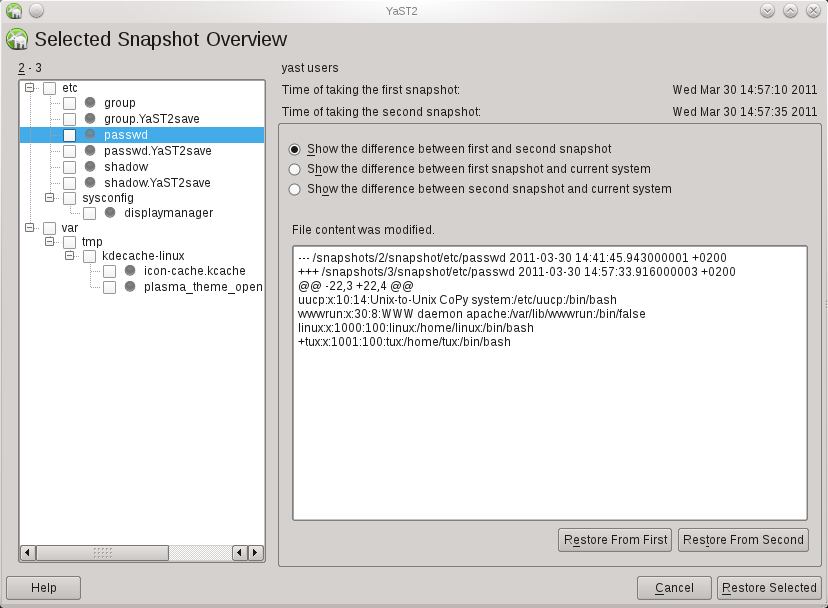
Testing

Playing with snapper should only be done on test machines. Both btrfs and snapper are not finished and included known bugs. Here is a step-by-step manual for installing and configuring snapper for openSUSE 11.4.

Feedback

We would like to get feedback, esp. about general problems and further ideas. There are also tasks everybody can work on, e.g. the snapper wiki page or a man-page for snapper.

For the time being there is no dedicated mailing-list so just use opensuse-factory@opensuse.org.

28 Partitions on a Single Disk? No Problem!

August 5th, 2009 by

So far it was only possible to have upto 16 device nodes for a single disks. This restricted the number of usable partitions. As a workaround kpartx could be used to create device mapper mappings for further partitions but that was never fully integrated in openSUSE.

With version 2.6.28 the kernel supports upto 256 device nodes per disk, much more than the partition table allows. But since the implementation is not straightforward, the additional device nodes are assigned dynamically, user-space programs may need to be adapted.

For openSUSE 11.2 Milestone 5 YaST was extended to support this new kernel feature.

Some quick tests showed only problems with LVM. If you are interested in this feature and have the possibility please give it a try so that we find remaining bugs.

Introducing Libstorage

July 20th, 2009 by

Libstorage is a C++ library for managing Linux storage devices. So far it was developed as part of YaST but since a few weeks it is an independent project.

Here is a code example creating a 1GB partition on /dev/sdb.

  Environment env(false);
  StorageInterface* s = createStorageInterface(env);

  string name;

  // Create 1GB partition on /dev/sdb and format it with Ext4.
  s->createPartitionAny("/dev/sdb", 1048576, name);
  s->changeFormatVolume(name, true, EXT4);

  // Set mount-point to "/home" and fstab option to "relatime".
  s->changeMountPoint(name, "/home");
  s->changeFstabOptions(name, "relatime");

  // Set filesystem label to "HOME" and mount filesystem by label.
  s->changeLabelVolume(name, "HOME");
  s->changeMountBy(name, MOUNTBY_LABEL);

  // Commit the change to the system. This will create the partition,
  // format and mount it and update /etc/fstab.
  s->commit();

  destroyStorageInterface(s);

Besides of hard-disks libstorage handles RAID, LVM, NFS, various filesystems and encryption. Swig generated Python bindings are also provided. Libstorage has no dependencies on YaST, neither for building nor runtime. We hope libstorage will also be useful for other projects.

More information is available in the openSUSE Wiki, including a list of useful features people would love to see implemented in the near future.

Comments are as always welcome.

YaST and Compiz during Installation

April 1st, 2009 by

We (Thomas Göttlicher, J. Daniel Schmidt and Arvin Schnell) have use all our
remaining ITO for this really cool feature.

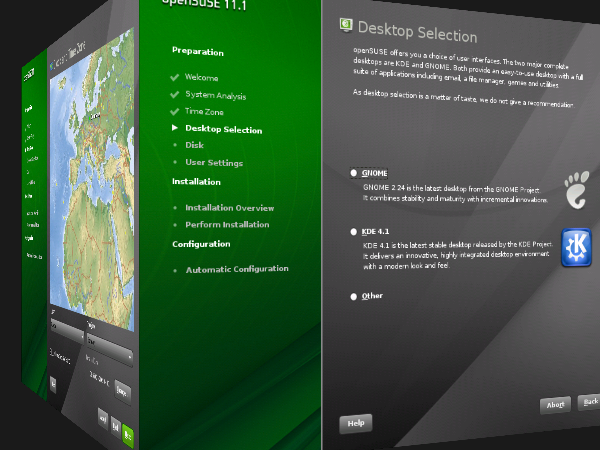
Normally compiz (more precisely the cube module) shows each desktop on the
surface of a cuboid. Since we don’t have several desktops during installation
we decided to show the “wizard” steps on the cuboid. Pressing “Next” or “Back”
rotates the cuboid around the y-axis:

screenshot1

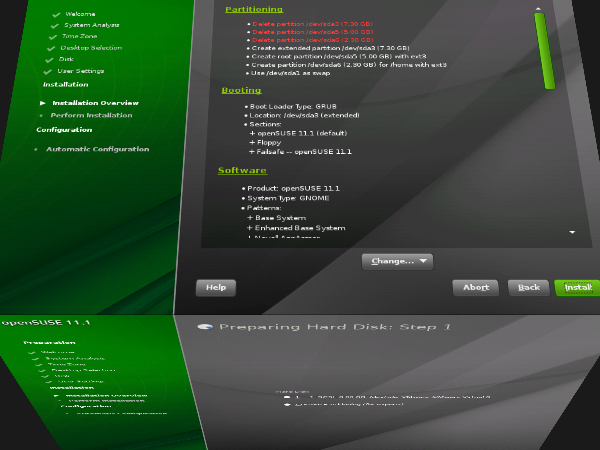
Entering a “subwizard” rotates the cuboid around the x-axis:

screenshot2

Fortunately most computers are fast enough to render the 3D-scene even without
special hardware support that we lack during installation.

Will be available in Factory within the next weeks. Comments are welcome.

Context Menus in YaST Partitioner

March 6th, 2009 by

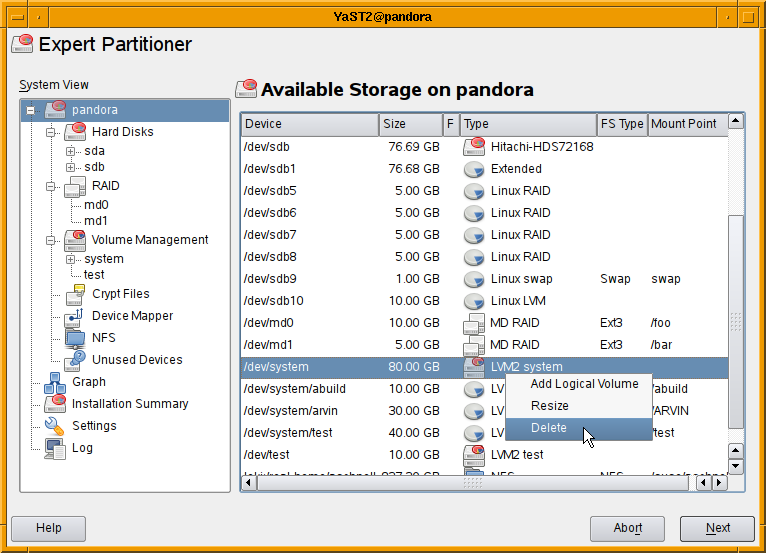
We received some complains that the redesigned partitioner on openSUSE 11.1 is
tedious to use. To remedy these shortcomings I’m adding context menus to the
tables so that it is no longer required to select the correct view using the
navigation tree to perform some operation. Almost all operation should be
available via context menus in the main view listing all devices.

screenshot

As usual comments are welcome.

Graph of Storage Devices

January 19th, 2009 by

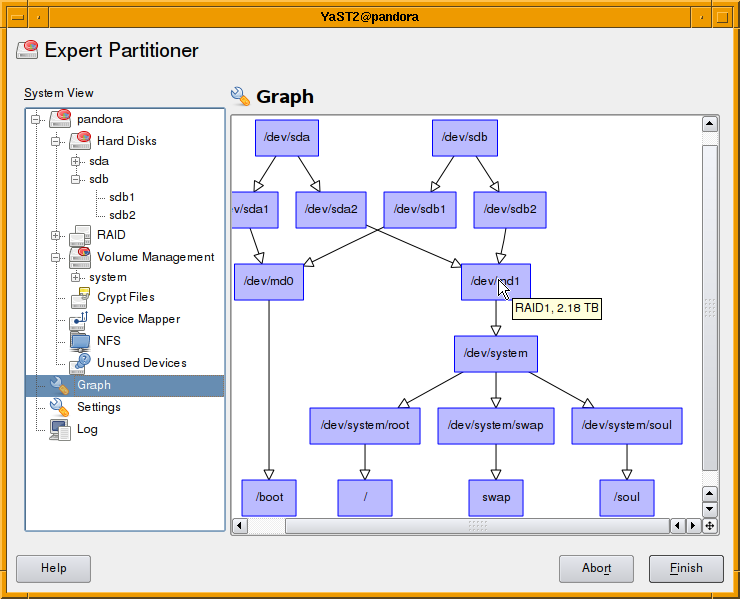
With openSUSE 11.1 on the road we developers can use some time for new ideas. One idea on my mind for month was to show the dependencies of storage devices in a graph. Using graphviz and QGraphicsScene a first version was running within few days.

It’s far from finished. Some items still missing are:

  • Use different shapes and colors for different devices types.
  • Some basic user-interaction.

Will be available in Factory within the next weeks. Further improvements are welcome.

Redesign of YaST Expert Partitioner

May 16th, 2008 by

We are redesigning the YaST Expert Partitioner for openSUSE 11.1 and SLE11. The main idea is to have a navigation tree with all available storage devices on the left side and to display information on the right side along with buttons to perform appropriate actions. See the screenshot.

RPMs are available in the openSUSE Build Server in the repository home:aschnell. They are far from finished by you can already navigate in the tree and inspect you storage system. It should be possible to see where we are heading with the redesign. You can install them on your openSUSE 11.0 Beta 3.