

In a small series of posts I’ll describe some tips and tricks for developing with libyui and libzypp in python.
Thanks to the YaST developers and Klaus Kaempf, there are bindings to libyui the Yast User Interface library for python.
For libzypp there are also python-bindings done by Duncan Mac-Vicar Prett and Arvin Schnell.
Both are generated with the swig code generator and are not perfect yet, but as we’ll see they’re pretty usable.
One big problem we need to solve is: libyui and libzypp are part of your base-system/YaST. If we would update them in the main system,
we would probably screw up zypper and YaST – which is bad.
Therefore I compiled libyui and libzypp and all other needed packages with an custom –prefix (/opt/yuitest) inside the openSUSE Buildservice.
Thus we can easily install the latest version without breaking our system.
In this first part we’ll install and test libyui.
So lets start with adding the Buildservice repo:
For 11.0:
zypper ar -r http://download.opensuse.org/repositories/home:/dl9pf:/yuitest/openSUSE_11.0/home:dl9pf:yuitest.repo
For 10.3
zypper ar -r http://download.opensuse.org/repositories/home:/dl9pf:/yuitest/openSUSE_10.3/home:dl9pf:yuitest.repo
Then refresh zypper:
zypper ref
Install the new packages:
zypper install po-python-yui prefix-opt-yast2-qt prefix-opt-yast2-ncurses
Now we have installed the new libraries in parallel under /opt/yuitest . But we need to make sure these libraries are used.
We need to set some environment variables – LD_LIBRARY_PATH and PYTHONPATH – before launching python.
To do this I created a bash wrapper “mypyhton” in ~/bin/ with the content:
For 32bit:
LD_LIBRARY_PATH=/opt/yuitest/lib/ PYTHONPATH=/opt/yuitest/lib/python2.5/site-packages/ python $@
For 64bit:
LD_LIBRARY_PATH=/opt/yuitest/lib64/ PYTHONPATH=/opt/yuitest/lib64/python2.5/site-packages/ python $@
So for easy cut’n’paste :
32bit:
cat << EOF > ~/bin/mypython

#!/bin/bash

LD_LIBRARY_PATH=/opt/yuitest/lib/ PYTHONPATH=/opt/yuitest/lib/python2.5/site-packages/ python \$@

EOF
64bit:
cat << EOF > ~/bin/mypython

#!/bin/bash

LD_LIBRARY_PATH=/opt/yuitest/lib64/ PYTHONPATH=/opt/yuitest/lib64/python2.5/site-packages/ python \$@

EOF
Not to forget:
chmod u+x ~/bin/mypython
Let’s test what we’ve done: download and run the first example code!
mkdir source

cd source

wget -nd "http://svn.opensuse.org/svn/yast/trunk/libyui-bindings/swig/python/examples/hello_world.py"

mypython hello_world.py
TADA 😉 – you should see a QT GUI.
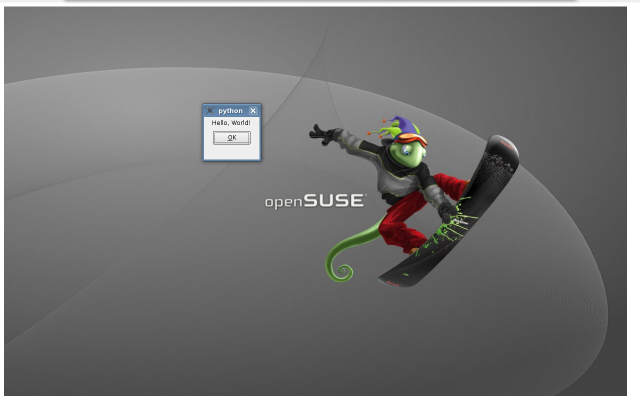
But libyui can do more – it even works on the console as you know yast works there.
export DISPLAY2=$DISPLAY  #save display

unset DISPLAY

mypython hello_world.py
Hey 😉 , now you can see the blue console interface.
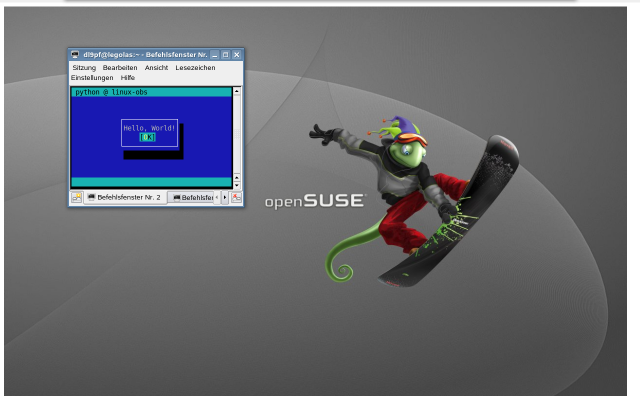
Let’s restore the DISPLAY variable for now …
export DISPLAY=$DISPLAY2
If you retry now, you’ll see the graphical UI again.
Next: Advanced libyui example and install of libzypp python-bindings.
My special thanks go to: Klaus Kaempf, Stefan Hundhammer, Michael Andres, Michael Matz, Martin Vidner, Duncan Mac-Vicar Prett and Arvin Schnell.
P.S.: The wallpaper can be found here.
Both comments and pings are currently closed.


Totally off topic.. Where I can download that wallpaper? 🙂
-> P.S.: The wallpaper can be found here.
http://www.kde-look.org/content/show.php/opensuse-geeko-snowboard-for-laptop?content=89244