Hi all!
Well , beginning from this week i will start to work on one small project (one week).
Probably it would be a YaST or QT application, so if you had a really good idea, give me simple feedback.
Hi all!
Well , beginning from this week i will start to work on one small project (one week).
Probably it would be a YaST or QT application, so if you had a really good idea, give me simple feedback.
Today I tried a new way to do a live upgrade with one of my machines from 11.0 to 11.1. In the end, it takes nearly 1 day, because I had to download nearly 3,2 GB software (puh!) – but for me it was just a 3 minute work
It turns out that the most problematic part was the new RPM-”Distribution” string for openSUSE since 11.1. As openSUSE is now completely build in the openSUSE Build Service, the Distribution string of each package switched from “SUSE LINUX Products GmbH” to “openSUSE 11.1″ – and zypper complains about this vendor switch during a live upgrade.
My Solution: Just create a new file “/etc/zypp/vendors.d/openSUSE” as root and insert the following content:
[main]
vendors=openSUSE,SUSE LINUX Products GmbH
Now, zypper identifies packages from Vendor “openSUSE” as the same as packages from vendor “SUSE LINUX…”
Whats left is the adaption of the repositories (they should point to 11.1 now):
localhost:~ # cd /etc/zypp/repos.d/
localhost:~ # sed -i “s|11.0|11.1|g” *
…and right afterwards, the show can go on…
localhost:~ # zypper ref
Retrieving repository ‘OBS-Edu’ metadata [done]
Retrieving repository ‘Packman Repository’ metadata [done]
…
localhost:~ # zypper dup
Loading repository data…
Reading installed packages…
Computing distribution upgrade…
The following packages are going to be upgraded:
…
Press “y” and Enter – and go to bed or something else – next day, reboot your machine and welcome your new 11.1!
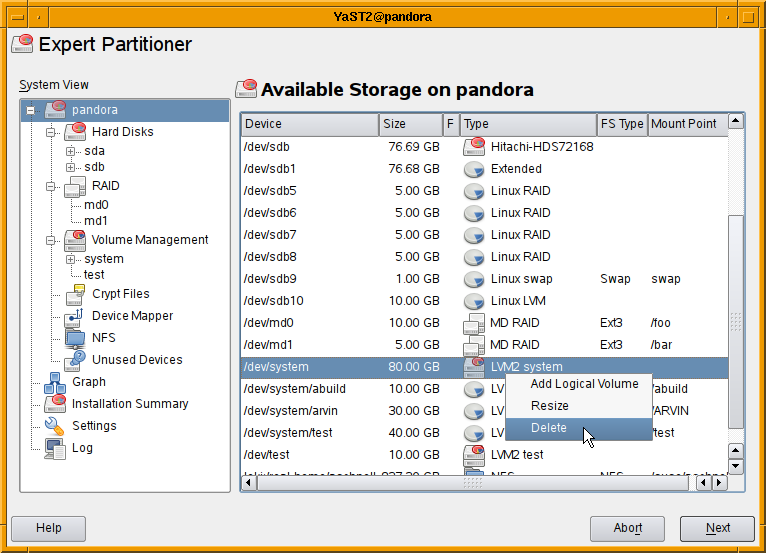
We received some complains that the redesigned partitioner on openSUSE 11.1 is
tedious to use. To remedy these shortcomings I’m adding context menus to the
tables so that it is no longer required to select the correct view using the
navigation tree to perform some operation. Almost all operation should be
available via context menus in the main view listing all devices.

As usual comments are welcome.

Screenshot of TurboGears 2
It’s been quite a while since I last posted an update on the state of python-turbogears in the openSUSE build service. The TurboGears project currently has three branches open (which seems to cause more confusion that actually help people) – the 1.0 branch, the 1.1 branch and the 2.0 branch. Whereas newcomers are advised to install from the 1.0 branch and to develop web applications based on that branch, the truth is that most of the active development goes on in the 2.0 branch. TurboGears 2.0 is at beta7 stage right now – features are frozen and a release data is in sight for the big 2.0.
Without getting into the major differences between 1.0 and 2.0, many people on the TurboGears Google Group have expressed the opinion that the 2.0 branch, despite its beta suffix, is exceptionally stable and well suited to production deployment. One of the major obstacles facing people was how to actually install it. Because it requires some cutting edge packages which might not be standard fare for many distributions, it is recommended to install TurboGears2 (beta) in a virtual python environment using the virtualenv package. Once the new virtual environment is ready and activated, a simple easy_install will automatically install the TurboGears2 package and its requirements. This is well documented.
I got a bit fed up with the virtual environment setup – it worked fairly well, but I was constantly having to set up completely new virtual environments just to install another TurboGears web application. There is an option when using virtualenv, to make the entire virtual environment “mobile” (meaning that you can pack virtual environment plus web app off to another computer easily), but it wasn’t working for me.
Enter python-TurboGears2 on the openSUSE build service. It took me a couple of days to get all the dependencies in the correct versions and installing properly, but it looks as if it works now. As TurboGears2 will be in a more or less constant state of flux until the final 2.0 release, there will probably be quite a lot of work to do to keep the packages up to date, but it’s worth it for the simple zypper in python-TurboGears2
What I want to do now is to try creating a SUSE Studio based virtual appliance – that way practically any web app could be created and setup easily – and with a bit of elbow grease you could probably use apparmor etc to make it rock solid.
PS: it would be well cool if people would test the package
Tomorrow(07.03.09) we have scheduled meeting of Russian community.
Meeting will take place at 19:00 (GMT+3 (MSK)) on
#opensuse.ru channel (Freenode)
We are going to:
*Discuss some terms. And choose which translation of which term are more appropriate for translation.
*Fill up the glossary.
*Cleanup ru.opensuse.org wiki .
*Choose candidates for “Spokesperson program” from Russia.
*Discuss what’s wrong with wiki. Why peoples creating another suse portals. (like open-suse.ru, suseclub.ru,suseclub2.ru)
*Discuss what we can do to involve more users in community life.
I’m glad to see all interested Russian users on #opensuse.ru channel tomorrow.
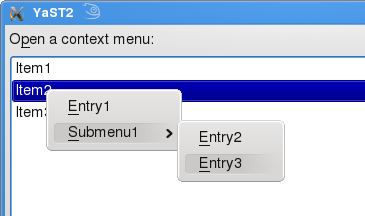
Context menus are supported by almost all UI frameworks and most people got used to them. Therefore it’s high time to provide context menus in the YaST Qt UI as well. yast2-qt-2.18.6 offers this feature, packages are available in my build service repository.

In four simple steps YCP programmers can benefit from this new feature:
Step 1:
Create a widget and tell via `opt(`contextMenu) that a ContextMenuActivated Event should be emitted when the user right clicks the widget:
`SelectionBox( `id(`sport), `opt(`notify,`immediate, `contextMenu),
"Open a context menu:",
[
"Item1",
"Item2",
"Item3"
] );
Step 2:
Wait and analyze events:
event = UI::WaitForEvent( ... );
...
if ( event["EventReason"]:"" == "ContextMenuActivated" )
...
Step 3:
Open a context menu. The argument of OpenContextMenu() describes the menu structure:
UI::OpenContextMenu( `menu(
[ `item(`id(`folder), "&Folder" ),
`menu( "&Document",
[ `item(`id(`text),
"&Text File" ),
`item(`id(`image),
"&Image" ) ]) ] ));
Step 4:
Analyze the returned `id and trigger an action. An example called ContextMenu.ycp is included in the package yast2-ycp-ui-bindings.
Usability
A Context menu provides shortcuts to actions for a certain widget or item. This features improves usability when it’s used properly. Application programmers should avoid making certain features only using context menus because users might not find them.
Please keep in mind that YaST ncurses doesn’t provide context menus. Each operation that is only available via a context menu is useless in YaST ncurses because the user cannot select it.
Hello Folks,
now following an List from my last updated/worked Packages:
Have a lot of Fun
Let me present you the openSUSE forums statistics for February 2009.
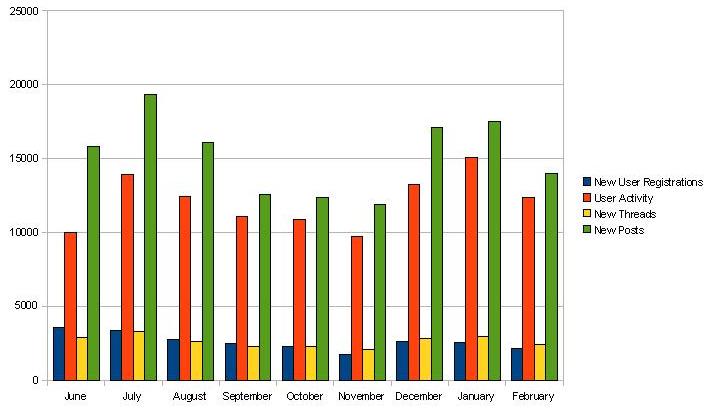
Up to the 28th of February 2009, we achieved a membership of 23.464 (+2.142) members, 23.463 (+2.390) threads and 136.684 (+13.989) posts. The number in brackets shows the increase of the corresponding measurement compared to the last snapshot taken on the 31st of January 2009. The user activity, i.e. the number of individual visits to the openSUSE forums, was 12.382 for the observed period. Most users ever online still was 7.771 on the 2nd of December 2008.
The following diagram shows the monthly development of new user registrations, user activity, new threads and new posts since the launch in June 2008.

Kudos to our Top5 posters during February 2009
Thanks as usual for making the openSUSE forums a worthwhile place to be.
If you haven’t signed up for the openSUSE forums yet, please consider doing so. It’s a great way to contribute to the openSUSE community in a non-developing capacity.
Any contribution to the recently announced “experts approach” collaboration between the openSUSE forums and the openSUSE Weekly Newsletter is much appreciated. If you’re interested to participate, please don’t hesitate to contact me for further information. Any comments and suggestions of the community about the OSF status reports is much appreciated by the openSUSE forums team. We’re certainly interested to know what the community would like to be covered in coming issues.
I’m happy to announce that OpenOffice.org 3.1 alpha1 packages are available in the Build Service OpenOffice:org:UNSTABLE project.
The packages are alpha versions and might include even serious bugs. Therefore they are not intended for data-critical usage. A good practice is to archive any important data before an use, …
We kindly ask any interested beta testers to try the package and report bugs. We are especially interested into the testing of SMB access and file locking.
Other information and plans:
The next version will have hopefully the beta quality. It should include an initial implementation of the OOXML export filters and thus improve the interoperability with MS Office 2007. It should be done the openSUSE-11.1-like split build way and thus provide also the most important extensions. I hope that it will be available by the end of the following week.
I am going to update the OOo-3.0.1 packages in the OpenOffice:org:STABLE project. It should include even better fix for the update problem on openSUSE-11.1 (bug #471280). It will include few more important fixes. It should be available by the end of this week.
Back in the (should I say: old?) days books were created from dead trees. Now, with the raise of different reading devices, we can read them digitally. Thanks to Kovid Goyal we can enjoy ebooks with the Calibre reader also on your ordinary PC or laptop.