Author Archive for Andrea Florio
openSUSE-LXDE : improvments to PCManFM
Wednesday, September 30th, 2009 by Andrea Florio
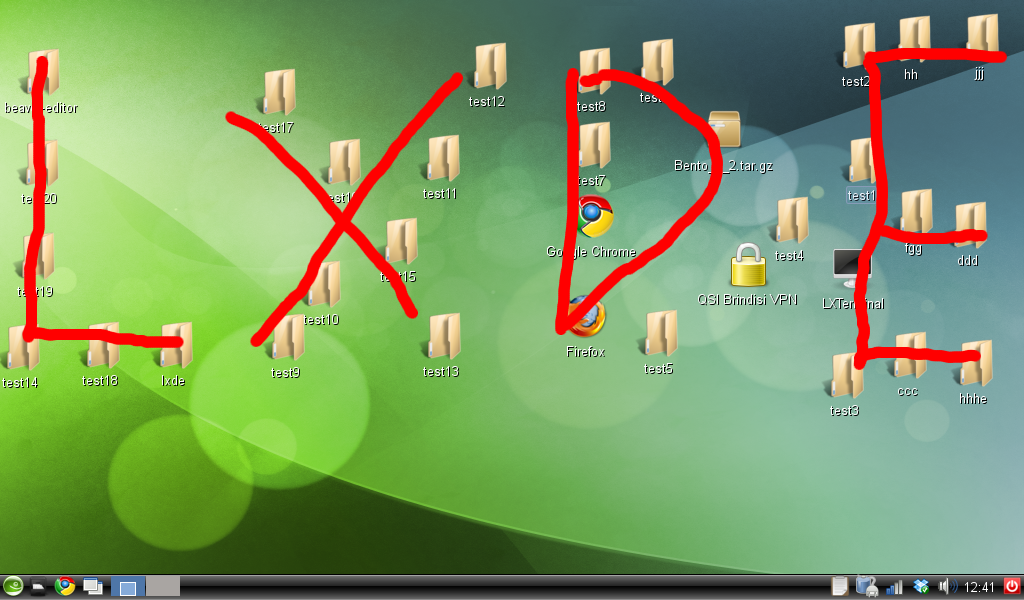
That picture talks… your quest is to find the news!!!
BTW on the screen you can see the work in progress openSUSE-LXDE for openSUSE-Factory (the next 11.2). Notice how LXDE use only 108MB RAM and 5% CPU with:
* Firefox 3.5.3
* OpenOffice.org (writer) 3.1.1
* Pidgin
* LXTask
that’s amazing isn’t it? (Don’t focus on red lines… The background is nice but THIS IS NOT the new, check the ICONS)
Thanks to Miguel Albalat Aquila for the patch
Thanks to me for changing on the patch to allow it to work with trash support patch
Andrea
openSUSE-LXDE Live CD 1.0.0
Sunday, September 13th, 2009 by Andrea FlorioAfter lots of test i’m ready to release a new openSUSE-LXDE live CD
Here the change log:
Fix: Lxpanel will "flash" no more (workaround, removed battery applet from panel,
this applet make lxpanel crash if no battery is found on laptop)
Fix: Added wireless-tools, usbtools, acpid
Fix: Added iwl*-ucode packages (intel wireless cards now working)
Fix: Ath_pci and ath5k conflicts no more (ath5k in blacklist)
Feature: Added Trash support
Feature: Added bluetooth support
Feature: Added "sudo"
Feature: Added "gdb" to help in debugging if crash occurs on LXDE applications
Feature: Added "fuse" and "ntfs-3g"
Feature: Added "rdesktop"
I hope you will enjoy that new release.
Before show you some shots, i would like to attract your attention on a feature i open on openFATE and that is also on the weekly news #88
That features asks to provide LXDE into OSS repo, and to made that installable from DVD media like XFCE.
Please add you vote: Feature Request: #307729: Officially Provide LXDE
Any way, going back to the live, you can download 1.0.0 and 0.9.4 releases from that URL:
http://www.steamedfish.org/downloads/
MD5 and SHA1 sums are available on that page, a very very BIG thank to Fisher Duan for hosting.
Again please report any issue on my email: andrea[at]opensuse[dot]org
Please notice how “free -m” on lxterminal show that the REAL used ram is just 67MB with the following running applications:
1) Firefox 3.5.2
2) PCManFM
3) Lxterminal
4) Lxtask
LXDE: LXDM and Trash support
Saturday, September 12th, 2009 by Andrea FlorioSome cool news for any LXDE users.
The first one, LXDE developers finally started to develop their own Display Manager, that means that soon we’ll need no more the very heavy GDM or the no more developed SLIM.
That new DM is called (as you can think) LXDM and svn snapshot are now available in my home:anubisg1:LXDE repo, as soon it will be stable enought i’ll move it into X11:lxde.
(more info about LXDM available here: http://blog.lxde.org/?p=531
SLIM itself has been improved with a couple of patches and the logotrate support.
The second cool thing is a nice patch i got from a Slackware developer, it add trash support using the python trash-cli based on freedesktop.org standards. PCManFM with trash support is alread yavilable into X11:lxde and home:anubisg1:LXDE repos.
Some screenshots here:
Please consider that home:anubisg1:LXDE needs to be considered a development only repo. I experiment in my repo, and only when i think the changes are stable enought than i’ll move the into OFFICIAL X11:lxde repo.
Software Freedom Day Italy (Perugia)
Thursday, September 10th, 2009 by Andrea FlorioAs last year FSUGitalia, with “Regione Umbria” support , and with the collaboration of ITC “A. Capitini – Vittorio Emanuele II” and OSSpg (http://www.osspg.net ) is working to organize the Software Freedom Day.

Software Freedom Day (SFD) is a worldwide celebration of Free and Open Source Software (FOSS). Our goal in this celebration is to educate the worldwide public about of the benefits of using high quality FOSS in education, in government, at home, and in business — in short, everywhere! The non-profit company Software Freedom International coordinates SFD at a global level, providing support, giveaways and a point of collaboration, but volunteer teams around the world organize the local SFD events to impact their own communities.
This year all the Italian openSUSE Ambassadors will be there:
| Andrea Florio | Italy | Puglia, Brindisi | Anubisg1 |
| Mariano Iumiento | Italy | Roma | Miumiento |
| Alexjan Carraturo | Italy | Milano, Arezzo | Axjslack |
We hope to see you there!
openSUSE-LXDE live CD now ready!
Wednesday, September 2nd, 2009 by Andrea FlorioYes, that’s true! After some develop and tests i finally completed the openSUSE-LXDE live installable iso based on openSUSE 11.1 made with SUSE-STUDIO.
I provide now, only 32bit (i686) image because that may still need some testing.
Some great news, bug #531667 has been accepted and fixed, that means that suse 11.2 will be able to run slim using /etc/init.d/xdm script as usual. The iso already includes that fixs.
here iso link: http://lxde.bsnet.se/openSUSELXDE_32bit.i686-0.9.4.iso
— post edit —
Thanks to Fisher Duan we have a new “mirror” here:
http://www.steamedfish.org/downloads/
— post edit —
if somebody else wants to host it, feel free to do it, just email me : andrea@opensuse.org
Oh, i forgot, some release notes and links:
RELEASE NOTES:
Login Manager : SLIM
Login manager used here is very lightweight, i’m talking about SLIM. it’s actually configured to autologin ROOT user on live CD; that setting is also saved on installed system (if you choose to install it), so to remove autologin (or just to autologin with you user) you MUST edit /etc/slim.conf, the file is well commented will not be difficult to find the lines.
LINKS:
Thanks to: Brother- for hosting
Andrea
LXDE can do it! LXDE on Android smartphone!
Monday, August 24th, 2009 by Andrea FlorioYes i did it. I made LXDE running on my new Android smartphoe, the latest HTC masterpiece, the HTC HERO. Here some shots:
That’s great! But there is a main problem here, I’m not running openSUSE with X11:lxde packages, but debian with their stuff. I cannot use my geeko because the phone is an ARM and our openSUSE@ARM looks to still be in an early development stage. This post wants to be a ping to or openSUSE@ARM project and of course some marketing to this great and light Desktop Enviroment. For people interested in, here some hardware infos:
# cat /proc/cpuinfo
Processor : ARMv6-compatible processor rev 2 (v6l)
BogoMIPS : 526.25
Features : swp half thumb fastmult edsp java
CPU implementer : 0×41
CPU architecture: 6TEJ
CPU variant : 0×1
CPU part : 0xb36
CPU revision : 2
Cache type : write-back
Cache clean : cp15 c7 ops
Cache lockdown : format C
Cache format : Harvard
I size : 32768
I assoc : 4
I line length : 32
I sets : 256
D size : 32768
D assoc : 4
D line length : 32
D sets : 256
Hardware : hero
Revision : 0080
Serial : 0000000000000000
# busybox free
total used free shared buffers
Mem: 197016 191024 5992 0 8
Swap: 0 0 0
Total: 197016 191024 5992
LXDE, working on “branding-openSUSE”!
Friday, July 17th, 2009 by Andrea FlorioPeople that use my HOME project p,robably noticed lots of packages upgrades this days, they are most of all code fixing (to fix gcc post build checks) but some of them are also packages improvments, right now infact, lxde-settings-daemon result to be obsoletes and will be dropped soon from the repo.But excluding this “developers only” topics, you may be interested to know that i’m orking on “branding packages“. the first branding packages will be released today (or next week when i’ll be back from greece XD). The most important branding picture i need to create il the logout one:

As you can see, even if it’s wonderful, it like a punch in our eyes, we need a GREEN, suse based image. Please help me, i’m not so good with images. you can download the original logo from LXDE svn here. Any way, the image MUST be a 325×125 png file.
Feel free to post here progresses you made!
Andrea
Official X11:lxde project now open! We need you!
Monday, July 13th, 2009 by Andrea FlorioThanks to Pavol Rusnak, the official project X11:lxde is now open, first packages are already there available for testing, but, some of them just fail because of code and security checks, we need some patches than, before provide you the best packages you can imagine for that DE.
WE NEED YOU!!!
if any of you want to help us providing patches and various fixing you are welcome, and of course you can begin using OBS collaboration way: http://en.opensuse.org/Build_Service/Collaboration
A fast review of the problems we have are available on that post into LXDE forum.
Right now than, if you want to use LXDE you should continue to follow instructions provided on my previous blog post here
Waiting for you and you help
Andrea
Lightweight X11 Desktop Environment, A.K.A. LXDE
Saturday, July 11th, 2009 by Andrea Florio“Lightweight X11 Desktop Environment“, is an extremely faster, performing and energy saving desktop environment. It comes with a beautiful interface, multi-language support, standard keyboard short cuts and additional features like tabbed file browsing. LXDE uses less CPU and less RAM the other DE. It is especially designed for cloud computers with low hardware specifications like netbooks, mobile devices (e.g. MIDs) or older computers. It provides a fast desktop experience connecting easily with applications in the cloud. LXDE supports a wealth of programs. The source code of LXDE is licensed partly under the terms of the General Public License and partly under the LGPL.
Menage Skype and Facebook with Pidgin
Saturday, December 27th, 2008 by Andrea FlorioHi folks, Merry xmas to everybody…
i have a greate news for all pidgin lovers…
yes! you red well… i packaged two pidgin plugins that allow to to use pidgin fro skype and facebook chat!
don’t beleive me? here some pictures:
Skype


really nice eh? and it’s really easy to install and use! all packages you need are on my repository home:anubisg1 lots of you know it because of pidgin upstream version without the need to add GNOME repositories.
All you need to use it are skype4pidgin and pidgin-facebookchat packages. Once you install them you have to set-up your account… let me show you how.
On “add account” windows you’ll see 3 other protocols: facebook, skype, skype (D-BUS), choose the one you want as i did here:

now, if you choose facebook plugin, you simpy have to accept login.facebook.com SSL certificate and then you are ready to go. like here:

if you want to use skype plugin instead, right now you still need skype to installed and run…
On you first skype login using pidgin, you have to allow pidgin to connect skype like here:

that’s all.. you can now do anything you do with skype/facebook with pidgin too, you may want to know, that right now, the skype plugin directly use skype to start audio/video calls, because it is not able to do it..
Have fun with it.
Andrea
oh i forgot.. here links to the plugins home pages:


(2 votes, average: 4.50 out of 5)


(8 votes, average: 3.88 out of 5)