Home Home > 2008 > 12
Sign up | Login

Archive for December, 2008

Saschas Backtrace: Gobby (collaborative editor)

December 28th, 2008 by

By working in the Weekly News Team, one Problem was bad. Only one Person can edit in the Wiki at the same time. Now yesterday Jan (dl9pf) has an great Idea. We test an pice of Software called “Gobby”.

The Projectpage from Gobby is: http://gobby.0×539.de/trac/

You can install the Program with: zypper in gobby.

After running the Program you can go to “Existing Session” (I don’t know who is called in English),

After Login you see the following:

Working Place

Every User has an own Color. The first Section is the Place who you can edit an open Document. Every change what you are make. is in your own color. I have written “Dies ist eine Testnachricht”. And my color is orange. In the bottom of the Program is an Chat-Window. Here can all Editors communicate.

Menue

In the List of Documents you can see, what Documents are open. All in this List you can edit, or add an own Document.

In the Lust of Users you can see all Users with the own color.  And you can see, what Program is owned by other Users.

All in all i must say: This is an very nice Program. :-) I think we’re using this Program every time. I’ve heared that the new Version is delivered without the Chat Function.

In the next Time i try it out and write an Report.

By the Way, we would like to say: “Thank you” to the Gobby-Development-Team.

Menage Skype and Facebook with Pidgin

December 27th, 2008 by

Hi folks, Merry xmas to everybody…

i have a greate news for all pidgin lovers…

yes! you red well… i packaged two pidgin plugins that allow to to use pidgin fro skype and facebook chat!

don’t beleive me? here some pictures:

Skype

Facebook

really nice eh? and it’s really easy to install and use! all packages you need are on my repository home:anubisg1 lots of you know it because of pidgin upstream version without the need to add GNOME repositories.

All you need to use it are skype4pidgin and pidgin-facebookchat packages. Once you install them you have to set-up your account… let me show you how.

On “add account” windows you’ll see 3 other protocols: facebook, skype, skype (D-BUS), choose the one you want as i did here:

now, if you choose facebook plugin, you simpy have to accept login.facebook.com SSL certificate and then you are ready to go. like here:

if you want to use skype plugin instead, right now you still need skype to installed and run…

On you first skype login using pidgin, you have to allow pidgin to connect skype like here:

that’s all.. you can now do anything you do with skype/facebook with pidgin too, you may want to know, that right now, the skype plugin directly use skype to start audio/video calls, because it is not able to do it..

Have fun with it.

Andrea

oh i forgot.. here links to the plugins home pages:

http://code.google.com/p/skype4pidgin/

http://code.google.com/p/pidgin-facebookchat/

Enlightenment LiveCD

December 24th, 2008 by

Ladies and Gents!

Glad to announce the third release of unofficial Enlightenment LiveCD based on our brand new OpenSUSE-11.1.

Download page
‘Welcome’ notes (PDF)

Please visit the download page to see the details and try the mirror provided by Yandex.ru. Read the Welcome.pdf before you pop the disk into the PC/Qemu/etc.

Along with this “release” we made another ‘iso’ which has less software but carry the proprietary ATI/NVIDIA drivers and all components to build and install them for your PC. Instruction is here:
‘Development’ release
Disk has a kernel sources, gcc, make and other ‘user unfriendly’ packages – thet’s why it’s a ‘development’ one.

The brief changelog comparing to the old ‘release’:

  • all EFL applications now use the default themes. This allowed to save some valuable spase and provide additional software (like the latest ‘linuxdcpp’ with multithreading download capability)
  • SCIM‘ is included and ready to support the wide spectrum of international locales (added upon request from our Japanese colleagues)
  • operations with any external and internal volumes/storages under ‘User’ via hal+dbus+udev. You’re welcome to explore the amazing E17′s module ‘places‘ which allow an ordinary user to control and monitor all volumes on-the-fly
  • EFL/Enlightenment is build in OBS from svn revision 38164 (dated 20081215)
  • ~/bin folder has some nice scripts inside and we hope to provide much more useful tiny utilities next time
  • Wicd‘ is set as a default network configuration utility (instead of ‘Exalt‘ which is now in a heavy development). If you’re not happy with it – just use the default ‘NetworkManager’.
  • jwm is added as an example of a WM which could be configured in and out (man jwm). It’s very good for an old PC’s (along with ‘E16‘). We tested the disk with a 128 RAM – works…
  • and the most interesting feature – is a ‘0install‘ technology, which allow you to build your own ROX-Desktop from scratch (internet connection is required). The result is very close to ‘GoboLinux’ – just click on ‘ROX-Filer‘ menu entry (Applications -> System -> File Manager -> ROX-Filer)

Some new applications added like ‘Tracker‘, ‘Edje_viewer‘, etc., init routine adjusted and several other tricks performed to prepare yet another general-purpose Linux LiveCD. Below is a link to the small gallery of a screenshots:

screenshots

Exactly what you get by default. Unfortunately they can’t express the feel of E, which is “…like people say, amazing.” Mirror is updating right now and the new version soon will be there (hope so).

As usual we’re glad to receive your feedback.

Acknowledgments:

Enlightenment Development Team and Enlightenment Community
OpenSUSE Build Service Team
OpenSUSE KIWI Team (schaefi, cyberorg, pzb, cgoncalves – THANKS!)
Stalwart, thanks for the hosting!
Packman Team
Novell
Jan Engelhardt
and all the others, who helped to make it (Engineers, Developers, Users, Maintainers…)

Thanks!

Regards,
SOAD team

Saschas Backtrace: Interview with Petko D. Petkov on Netsecurify

December 24th, 2008 by

Petko D. Petkov is one of the founding-members of the Gnucitizen-hacker-network. They work inbetween internet, computers and security and always have very interesting projects going on, for example the “House of Hackers” a social-network for hackers and security experts. The Gnucitizen define themself as “a leading information security think tank, delivering solutions to local, national and international clients“.

Thier latest project is Netsecurify, an automated, webbased, remote testing tool, that enables security-testings of applications. One of the primary goal of the projects is not only to have a pioneering sort-of feeling, but foremost to support low-profit or non-profit organisations to have a robust and stable security-testing tools for free. They think of organisations, that otherwise would not be able to affort security experts and testing. We had a short interview with Petko D. Petkov on Netsecurify, their motivation, software design and overall goals.

What does the tool Netsecurify exactly do?

Netsecurify is a remote, automated, vulnerability assessment tool. The tool follows the SaaS (Software as a Service) model, i.e. it is a service which runs from Amazon’s scalable computing infrastructure. In it’s core, the tool performs several assessments, all based on open source technologies, and also provides recommendations through a flexible recommendation engine. The tool also allows 3rd-party organizations to enhance the reports.

Netsecurify is very simple to use. All the user has to do is to login and schedule a test for a particular network range. Once we approach the specified scheduled data, we run the test. When the test is done, the user is notified via email or by other means which we are working on at the moment. The user then logs in and downloads a copy of the report. For security reasons, the report is destroyed 30 days after it has been completed.

What was your motivation for starting the project?

The primarily motivation for starting this project is to provide free, quality, flexible, automated information security testing tool which can be employed by charity organizations, 3rd world countries, and in general, organizations and companies who cannot afford to spend money on security. Also, a huge motivational factor is the fact that no one has done a project like this. We are the first to do it. :) This is pretty cool.

Who are the people behind the project and how is the project organized (agency, virtual, decentralized)?

Technically speaking, the people behind Netsecurify are GNUCITIZEN. However, we welcome anyone who is interested to join us and help us improve it. Because the testing engine is based on open source technologies which we have glued together and we are continually enhancing, we are planning to contribute back to the community everything that we do and as such close the circle of energy. In theory, this makes the entire security community part of the Netsecurify project.

What is the basic design concept and how do you think will the project develop and evolve?

We have a scalable backend and very easy to use and flexible frontend. In between we have several APIs which allow us to expand the service as we go. The tool hasn’t been just built from scratch. There was a lot of thought and design considerations put into this project before the actual code. We follow the KISS (Keep it Simple Stupid) principle. We find that this approach works quite well for us. In the future we are planning to continue simplifying and enhancing the product.

Do you have other projects planned, that will be coming at us in the future?

We always have. Expect to see more from the GNUCITIZEN team soon.

Thanks to Martin Wisniowsky (mw@node300.com)

Original Link to this Interview: http://digitaltools.node3000.com/5minutes/interview_with_petko_d_petkov_on_netsecurify_testing_tool.php

YaST Qt4 Stylesheet Editor

December 23rd, 2008 by

YaST uses style.qss located in /usr/share/YaST2/theme/current/wizard by
default. If you want YaST to use a different style sheet (e.g. the style shown
while installation) you can set the $Y2STYLE environment variable:

Y2STYLE=installation.qss /sbin/yast2 disk

I’ve added a new hotkey to YaST which allows to modify the style sheet on
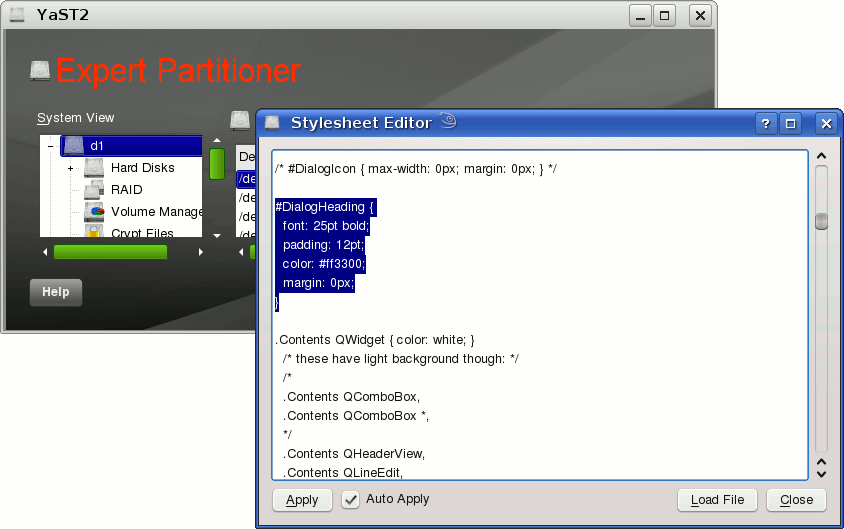
runtime. Pressing [Ctrl] + [Shift] + [Alt] + [S] in a YaST module opens the Stylesheet Editor. Now you can load a style sheet and modify its style rules.

Screenshot YaST Stylesheet Editor

The Stylesheet Editor can be very usefull when you want to design your own style for the YaST Qt4 UI.

This feature will be available in openSUSE 11.2. If you want to use it now all you need is yast2-qt version 2.18.2. You can find the latest version here:
http://download.opensuse.org/repositories/home:/tgoettlicher/openSUSE_Factory/

for our german people: “Freiesmagazin”

December 22nd, 2008 by

Two month ago, i noticed that an new Linux-Magazine has published. This Magazine is available in HTML and PDF Format. The Project URL is: http://www.freiesmagazin.de.

You can subscribe an RSS Feed, so you never missed an issue. The Magazine gives an global overview about the LINUX Market. It includes Reports about Hardware, Software and Distributions.
Have a lot of fun with it.

openSUSE Release Party in Nürnberg

December 19th, 2008 by

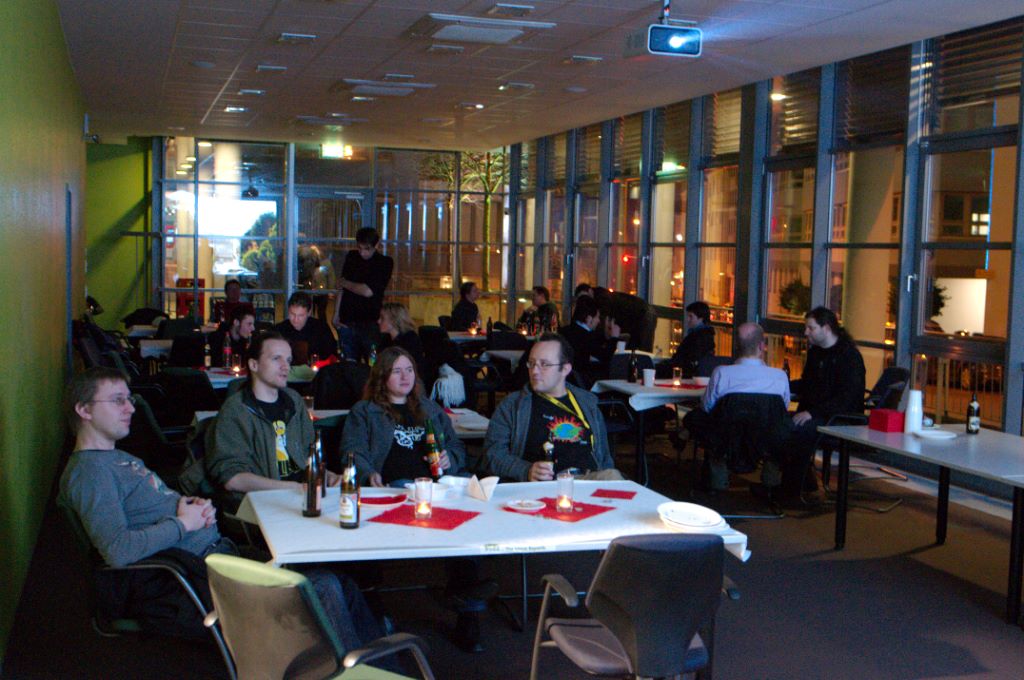
openSUSE 11.1 Releaseparty in NürnbergYesterday evening we had in Nürnberg the local release party which Martin announced a couple of days ago. I think we had around 50 participants, many from the local Novell office, but also people travelling by car for over an hour. The group was quite different: Developers, testers, users of openSUSE – also some people that just started using openSUSE and wanted to chat and celebrate with us. The youngest participant (my daughter) was 8 months old and sleeping most of the time.

We were fortunate to distribute openSUSE 11.1 DVDs and green hats.

I enjoyed talking with many that showed up and received as main feedback from many of those that I talked with: When will the presentation start? So, something to change for next time…

Thanks to Martin, Melanie and Jacqueline for the party – and thanks to all that joined us!

What changed in perl-Bootloader between 11.0 and 11.1

December 18th, 2008 by

I start with history. After 11.0 I became maintainer of perl-Bootloader (I never before write anything in perl, but know some other scripting language, so it is not so hard learn another one) after Alexander. Problem is that alexander doesn’t have enough time for maintainer it (he is also leader of arch team). This mean I get many unresolved bugs (around 150), because lack of resource prevents fixing it. Also I get some features to implement and some enhancement I found enough useful (some idea start in bug reports or on factory mailing list, so thanks community) to implement it. I describe what succeed and what not in rest of this blog entry. (more…)

My first trip to XSLT

December 17th, 2008 by

I found myself asking why XML formater to CSV (or what ever) should be so hard? So I started to explore XSLT stylesheets and all the bad things seems to fade a way and good things are here again!

Problem

Problem was to remove some nodes from XML-tree. There isn’t ‘good’ way to do this on XSLT (if there is please tell me!). but the XML dummy code looks like this:

<?xml version="1.0"?>
  <root>
    <node copy="0" id="1">
      <child>Child 1</child>
    </node>
    <node copy="0" id="2">
      <child>Child 2</child>
    </node>
    <node copy="0" id="3">
      <child>Child 3</child>
    </node>
    <node copy="0" id="4">
      <child>Child 4</child>
    </node>
    <node copy="1" id="5">
      <child>Child 5</child>
    </node>
    <node copy="0" id="6">
      <child>Child 6</child>
    </node>
    <node copy="1" id="7">
      <child>Child 7</child>
    </node>
    <node copy="0" id="8">
      <child>Child 8</child>
    </node>
    <node copy="0" id="9">
      <child>Child 9</child>
    </node>
    <node copy="0" id="10">
      <child>Child 10</child>
    </node>
</root>

and XSLT file for copying only copy=”1″ looks like this:

<?xml version="1.0" encoding="ISO-8859-1"?>
<xsl:stylesheet version="1.0" xmlns:xsl="http://www.w3.org/1999/XSL/Transform">

<xsl:template match="/">
 <root>
    <xsl:for-each select="/root/node">
     <xsl:if test="@copy='1'">
       <xsl:text>    </xsl:text>
       <xsl:copy-of select="."/>
    </xsl:if>
   </xsl:for-each>
  </root>
</xsl:template>
</xsl:stylesheet>

So its so short. Then just launch it with

xsltproc some.xsl some.xml

and there should be correct output :)

LTSP and x86_64 server x86 clients problems solved

December 17th, 2008 by

I was looking for something to solve my last problem how to heck compile binaries on x86_64 openSUSE 11.0 to KIWI-LTSP x86? I was lost.. totaly then i found this and decided to add LTSP developer tools (GCC and needed libs) and finally it worked. Only problem is that those LTSP machines are slow on building but I got to get icecream working on them :D . I admit this is not best way to solve this but seems to work…